How to Manage Facebook Page Comments and Messenger Enquiries
A customer may ask “Is this available?” beneath a Facebook Page post, then send a Messenger question about delivery. If the two conversations stay in separate inbox views, the team can miss the buying signal or repeat an answer without knowing who owns the next step.
Treat purchase questions in Page comments and Messenger as sales enquiries. Keep the original question and source, create a lead record, assign one responsible person, respond with confirmed information, and record the follow-up and outcome.
Which Facebook Comments and Messages Are Sales Enquiries?
Look for questions about price, availability, location, booking, delivery, sizes or a product link. A “Nice photo” comment is ordinary engagement; “Can I book this for Saturday?” needs a sales response. A short comment is a reason to qualify the customer, not proof that a purchase will happen.
Check both Page comments and Messenger. A customer may change channels after the first question. Keep enough context to understand the item or service they asked about, but do not ask them to post a private phone number publicly.
A Five-Step Process for Page Comments and Messenger Enquiries
- Review the source. Check the connected Page's new comments and Messenger messages for questions that may lead to a sale or booking.
- Capture the enquiry. Record the customer's question, the Page or message source and the relevant post or product context. If a supported interaction did not enter the CRM, add the lead manually.
- Assign one owner. Give a team member responsibility for answering and for the next action. Check existing records before creating duplicates.
- Respond accurately. Confirm price, availability, delivery or booking details with the business before promising them. Continue the conversation on the appropriate channel.
- Track the outcome. Set a follow-up date, update the lead status after contact and mark a sale as won only when the business confirms it.
Review due and overdue leads daily. A manager should be able to see which questions have an owner and which still need a response.
How LeadCat Manages Facebook Page Comments and Messenger Leads
With an eligible Facebook Page connected through Meta and the necessary permissions, LeadCat can create or update leads in the business workspace from supported Page comments and Messenger messages. The lead workflow records ownership, status, notes and follow-up dates. Authorised staff can handle their accessible leads while owners and managers review outstanding work.
For supported Messenger conversations on a healthy connection, authorised staff can send human replies from LeadCat within Meta's permitted customer-service window. A Page comment and a Messenger message are different interactions; the CRM workflow does not imply that every comment becomes a Messenger conversation.
Automatic comment replies, where available and enabled, are a separate configuration. The basic lead process works without them. This guide is about managing sales enquiries, not hiding, deleting or moderating public comments. See the Facebook Page comment and Messenger enquiry management solution for the product workflow and connection requirements, view a sample Facebook comment lead record, or compare tools to auto reply to Facebook comments.
Example: From a Page Comment to an Owned Lead
A furniture store posts a dining table on its Facebook Page. Someone comments, “Is the six-seater available in oak?” The team treats this as a possible sales enquiry rather than assuming the comment alone is a sale.
- A supported connected Page comment enters LeadCat, or a staff member records it manually if it is not captured.
- The lead keeps the question and relevant post context, and the manager assigns a salesperson.
- The salesperson checks the actual catalogue and stock before answering through the appropriate channel.
- The salesperson records the response, sets a follow-up date and updates the status when the customer decides.
This is an example workflow, not a customer result or a promise that every comment is captured automatically.
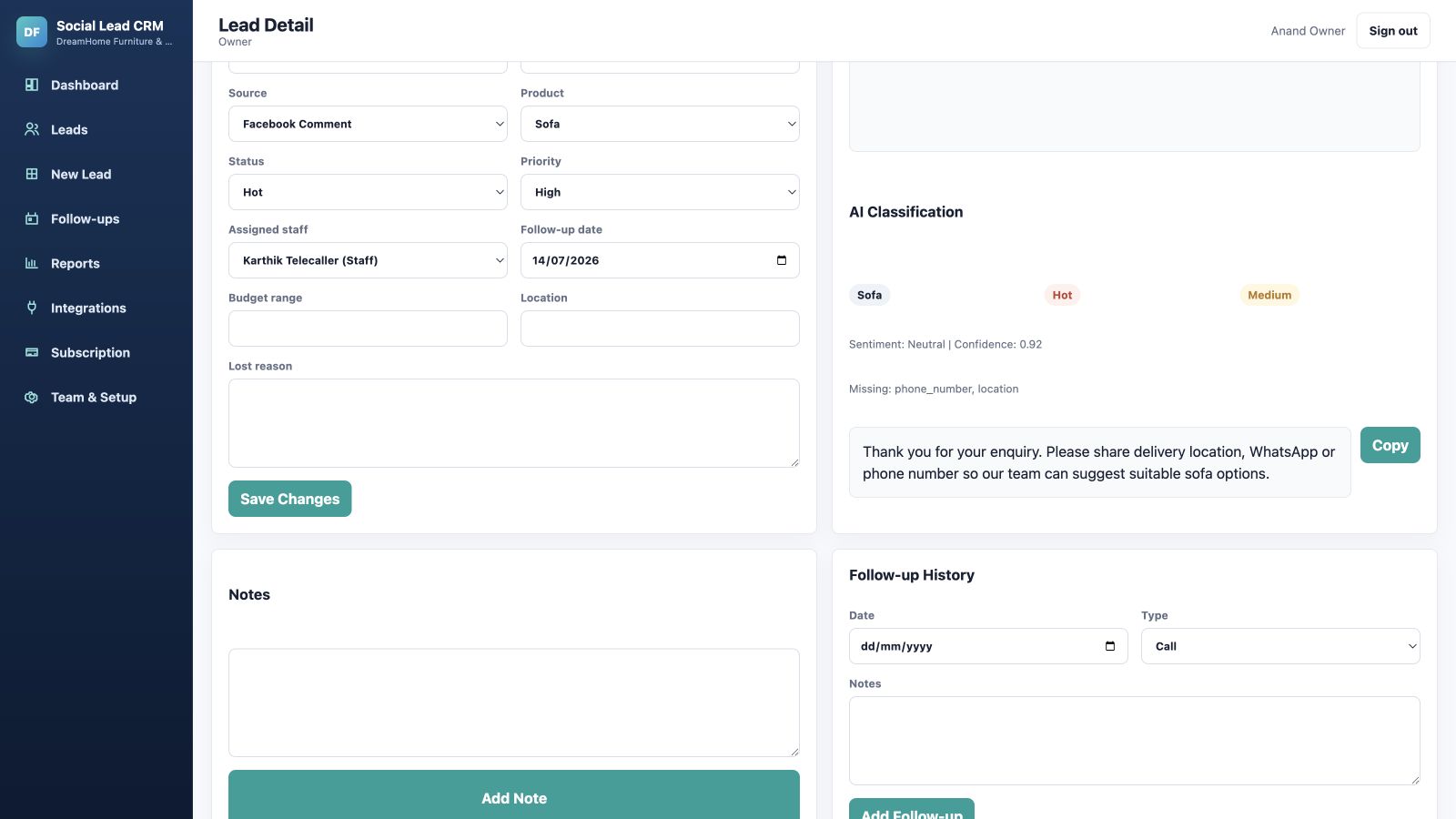
What the lead record looks like in LeadCat
The sample record below makes the handoff visible. The Facebook Comment source identifies where this separate sample enquiry began; Assigned staff names the person responsible; and Follow-up date keeps the next action on the lead. A status such as Hot is a team classification, not proof of a sale.
Frequently Asked Questions
Can Facebook Page comments become CRM leads?
Supported comments from an eligible connected Page can create or update LeadCat leads when the required permissions and features are available. A team member can add an enquiry manually if it is not captured.
Can a team manage Messenger enquiries together?
Yes. Supported Messenger messages from the connected Page can be managed as leads in the business workspace with an assigned owner, notes, status and follow-up dates.
Does LeadCat read personal Facebook profiles or groups?
This workflow uses an eligible business Page connected through Meta. It does not claim access to a person's private Facebook profile or unrelated groups.
Does a Page comment automatically receive a public reply?
Yes, when the configured public-reply action is enabled for an eligible Facebook Page comment. LeadCat can automatically publish a public reply and send a private Messenger DM reply. Reply actions depend on account permissions, supported content and campaign settings.
How do I prevent missed follow-ups?
Assign each enquiry to one person, record the next action and review due and overdue leads. Keep the outcome updated after the conversation moves forward.
Related LeadCat Guides
For automation choices, use the Facebook comment auto reply tools comparison. For other channels, read the guide to managing Instagram comments and sales enquiries or the guide to WhatsApp lead management and eligible auto replies. If customers are ready to buy, see the social commerce enquiry-to-order workflow.
Give every Facebook enquiry a clear owner
Bring supported Page comments and Messenger questions into a follow-up process your team can see.