Facebook Page comment and Messenger management
Facebook comment auto replies, private Messenger replies and lead management
Managing Facebook Page comments and Messenger enquiries gets harder when customer questions sit in separate conversations. Teams need to know who asked, who owns the reply and what happens next.
LeadCat can automatically reply publicly to eligible Facebook Page comments and send a private Messenger DM reply to the commenter. Enable and configure the actions for your connected Page, then manage the resulting leads with ownership and follow-up.
Manage Facebook Page comments as sales enquiries
Price enquiries, availability questions, location requests, product or service questions, link requests and questions about purchasing or booking all show customer intent.
Without a lead record, a conversation can be answered once and forgotten before the customer decides.
Learn how to manage Facebook Page comments and Messenger enquiries. Compare tools to auto reply to Facebook comments with public and private responses.
From Page comments and Messenger to assigned leads
Facebook enquiry → lead created or updated → owner assigned → follow-up tracked → opportunity progressed.
Capture Page comments and Messenger enquiries
Supported Page comments and Messenger messages from a connected Facebook Page can create or update a tenant-scoped lead.
Assign responsibility
Route the lead to the team member who should respond, qualify or continue the conversation.
Track what happens next
Use lead status and follow-up dates to keep the opportunity moving after the first interaction.
Automatic public Facebook replies and private Messenger replies
LeadCat can automatically publish a configured public reply beneath an eligible Facebook Page comment and send a private Messenger DM reply to the commenter. Enable the actions for the connected Page; Meta permissions, campaign settings and comment eligibility apply.
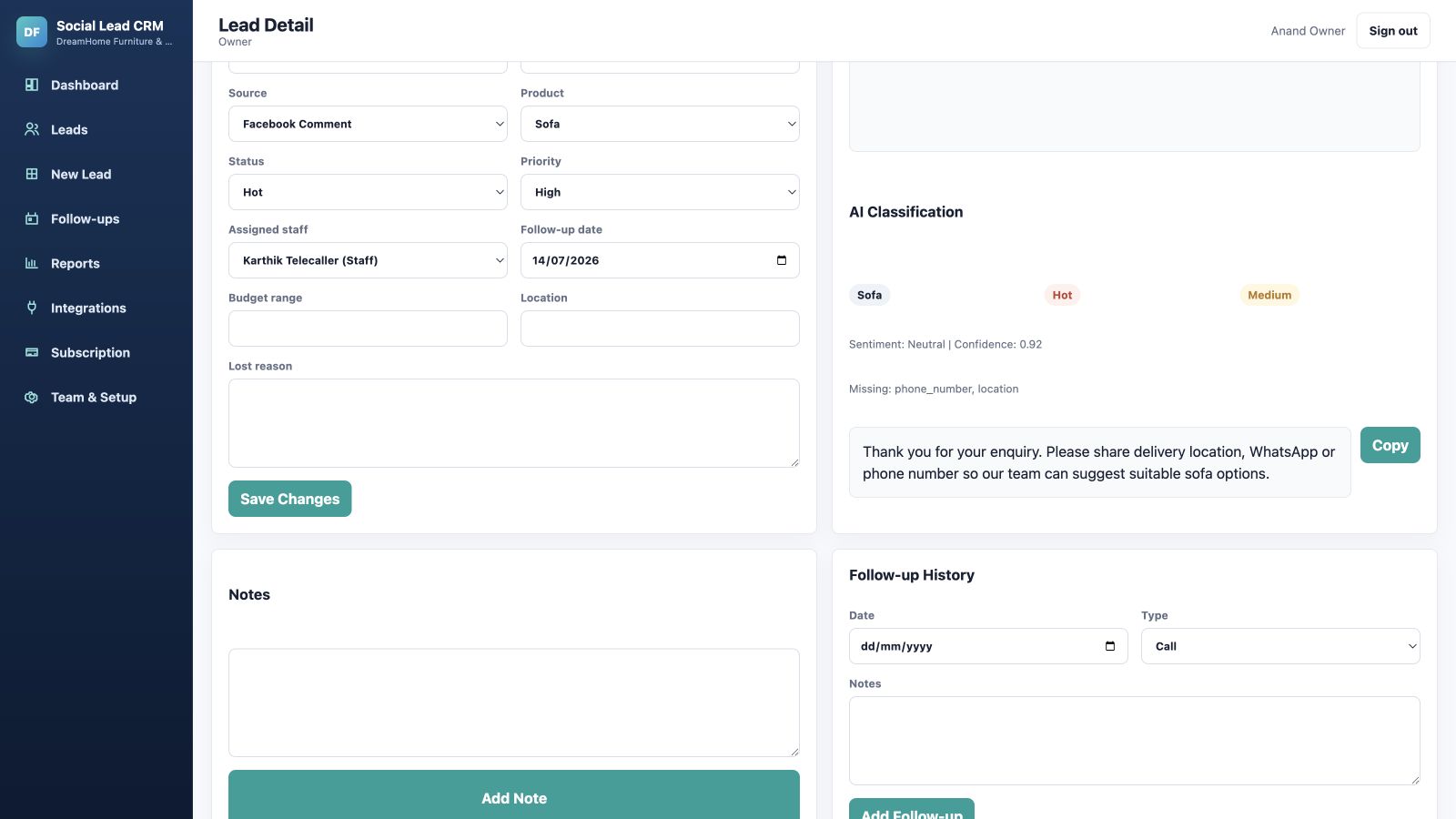
See a Facebook Page comment become an owned lead
This isolated sample lead is labelled Facebook Comment in LeadCat. Its record shows a lead status, assigned staff member and follow-up date so a Page question can continue through a sales process after the first response.
Automatic public replies and private Messenger replies
LeadCat can automatically publish configured public replies to eligible Facebook Page comments and send private Messenger DM replies to commenters. Configure and enable the actions for your connected Page; Meta permissions and campaign eligibility apply.
What this record makes visible
- Origin: the lead source is a Facebook Page comment.
- Responsibility: a named team member owns the follow-up.
- Next step: status and follow-up date remain with the lead.
Automatic capture requires an eligible connected Page and supported Meta permissions; staff can add other enquiries manually. Messenger is a separate supported conversation path. Read the Facebook enquiry guide, or compare tools to auto reply to Facebook comments.
Facebook enquiry management for teams and managers
LeadCat shows who owns the lead, whether follow-up happened, the current lead status and which active opportunities still need attention.
Built for businesses that sell through conversation
LeadCat can support retailers, education providers, property and automobile businesses, clinics, event and wedding providers, home and interior businesses, professional services and other small or growing teams.
Frequently asked questions about Facebook lead management
How can I manage Facebook Page comments and Messenger enquiries?
Connect an eligible Facebook Page through LeadCat’s approved Meta setup so supported Page comments and Messenger messages can be managed as leads.
Can Facebook enquiries be assigned to sales staff?
Yes. A LeadCat lead can be assigned to a specific team member.
How can I track whether someone followed up?
LeadCat keeps follow-up dates and lead status with the assigned lead.
Does LeadCat replace Facebook or Messenger?
No. Facebook remains the customer channel; LeadCat provides the lead-management layer for supported enquiries.
Is LeadCat suitable for small businesses using Facebook for lead generation?
Yes. It helps small teams establish a repeatable follow-up habit and can grow with them.